With this article, you can change the page ownership in Ariadne in just a few clicks. The new owner takes effect immediately – no approval workflow required.
Prerequisites
- You are the current page owner or a Key User
- You have access to the page in editor mode
How to change page ownership
Step 1: Open the page
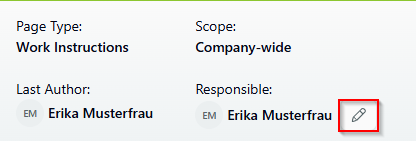
Open the page whose ownership you want to change. At the top of the page in the header, you'll find the name of the current page owner.
Step 2: Click on the edit icon
Click on the edit icon (pencil) next to the name of the current page owner in the header. This opens the modal "Change Owner".
Step 3: Select the new owner
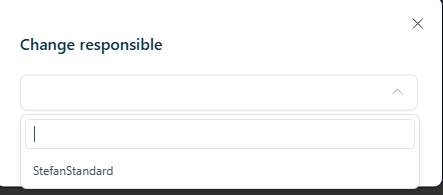
In the modal, you'll find a search field. Enter the name of the new owner or select them from the list. The current owner is displayed at the bottom.
Step 4: Save the change
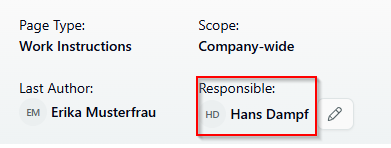
Confirm your selection. The new page ownership takes effect immediately and is displayed in the header.
What happens next?
The new page owner is registered immediately and receives all associated permissions and notifications. The change is documented in the page's audit log.
Related articles
Was this article helpful?
That’s Great!
Thank you for your feedback
Sorry! We couldn't be helpful
Thank you for your feedback
Feedback sent
We appreciate your effort and will try to fix the article