Dieser Artikel zeigt dir, wie du einen neuen Audit-Vorgang anlegst, welche Felder dabei zur Verfügung stehen und wie du den Fragenkatalog eines bereits bestehenden Audits übernimmst.
Audit anlegen
Lege einen neuen Vorgang vom Typ Audit an. Dabei stehen dir folgende Angaben zur Verfügung:
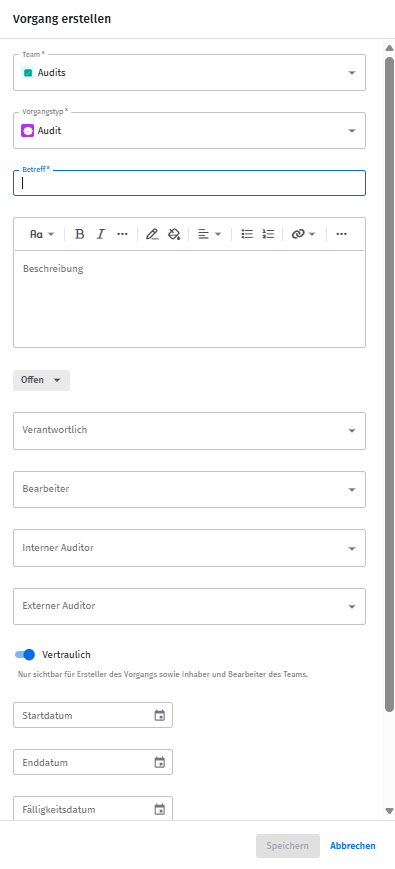
- Betreff: Pflichtfeld
- Beschreibung: Beschreibung des Audits
- Status: nähere Infos findest du hier > Audit-Status
- Verantwortlich: Die für den Audit verantwortlichen Personen
- Bearbeiter: Die für die Vor- und Nachbereitung verantwortlichen Personen
- Auditor: Die Person, die den Audit durchführt – entweder ein interner Nutzer oder Angaben zu einer externen Person
- Vertraulich: Legt fest, ob der Audit-Vorgang für alle Teammitglieder einsehbar ist oder nur für Inhaber und Bearbeiter
- Auditstart und -ende: Zeitraum, für den die Durchführung des Audits geplant ist
- Fälligkeitsdatum: Frei verwendbar, zum Beispiel falls die Nachbereitung bis zu einem bestimmten Termin abgeschlossen sein muss
- Wiedervorlagedatum: Frei verwendbar, zum Beispiel als Erinnerung, damit rechtzeitig vor dem Auditstart mit der Vorbereitung begonnen wird
Fragenkatalog eines bisherigen Audits übernehmen
Auch der Fragenkatalog eines bereits bestehenden Audits kann in einen neuen Audit übernommen werden – selbst wenn dafür keine Auditvorlage existiert.
An neuen Audit-Vorgängen, die noch nicht mit einem Fragenkatalog versehen sind, kannst du über die Funktion Fragenkatalog hinzufügen den Katalog eines bestehenden Audits übernehmen.

Mit den Bestandsdaten des ursprünglichen Audits wird wie folgt verfahren:
- Der Fragenkatalog des Audits wird übernommen.
- Seitenverknüpfungen an den Fragen werden übernommen.
- Anhänge (Dateien, Seiten), die am Audit-Vorgang selbst hängen, werden nicht übernommen.
- Vorgangsverknüpfungen werden nicht übernommen – weder vom Audit selbst noch von den einzelnen Fragen.
Verwandte Artikel
War dieser Artikel hilfreich?
Das ist großartig!
Vielen Dank für das Feedback
Leider konnten wir nicht helfen
Vielen Dank für das Feedback
Feedback gesendet
Wir wissen Ihre Bemühungen zu schätzen und werden versuchen, den Artikel zu korrigieren