Jede Chance wird über Nutzen und Erreichbarkeit bewertet. Aus beiden Werten berechnet sich automatisch der Chancenwert. Dieser Artikel erklärt dir die Chancenstatus, die Bewertung und wie du den Verlauf des Chancenwertes nachvollziehen kannst.
Chancenstatus
Eine Chance kann sich in unterschiedlichen Status befinden. Farben kennzeichnen dabei die Statuskategorien.
| Status | Bedeutung |
|---|---|
| Offen | Die Chance wurde erfasst, aber noch nicht weiter bearbeitet. |
| Analyse | Die Chance wird aktuell bewertet und untersucht. |
| In Bearbeitung | Es werden Maßnahmen zur Chancenbehandlung umgesetzt. |
| Pausiert | Die Bearbeitung der Chance ist vorübergehend unterbrochen. |
| Prüfung ausstehend | Die Chance wartet auf eine finale Prüfung oder Freigabe. |
| Neubewertung | Die Chance wird erneut eingeschätzt, z. B. nach Veränderungen. |
| Umgesetzt | Die Chance wurde verfolgt und umgesetzt. |
| Verworfen | Die Chance wurde als nicht relevant eingestuft und nicht weiterverfolgt. |
Chancenbewertung
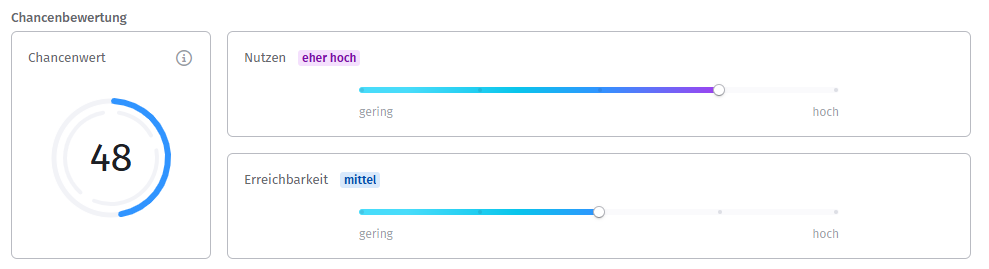
Die Bewertung einer Chance erfolgt über die Schieberegler bei Nutzen und Erreichbarkeit. Beide kannst du zwischen „gering" und „hoch" einstellen. Aus der Kombination beider Werte berechnet sich automatisch der Chancenwert.
Änderst du den Chancenstatus, wird die aktuelle Bewertung protokolliert und im Verlauf des Chancenwertes festgehalten.
Chancenwert
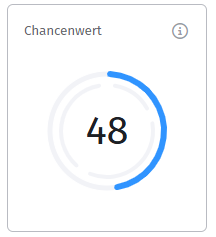
Der Chancenwert ergibt sich aus dem Produkt von Nutzen und Erreichbarkeit. Das Ergebnis wird auf 100 normiert.
Die Normierung auf 100 sorgt dafür, dass der Chancenwert unabhängig von den gewählten Bewertungsskalen immer im gleichen Wertebereich liegt. So bleiben alle Chancen miteinander vergleichbar und lassen sich nach Potential sortieren und filtern. Ein Wert zwischen 0 und 100 lässt sich zudem intuitiv einordnen, ähnlich wie eine Prozentangabe.
Anhand des Chancenwerts lässt sich das Potential einordnen, zum Beispiel in „Geringe Chance", „Mittlere Chance" oder „Hohe Chance".
Verlauf des Chancenwertes
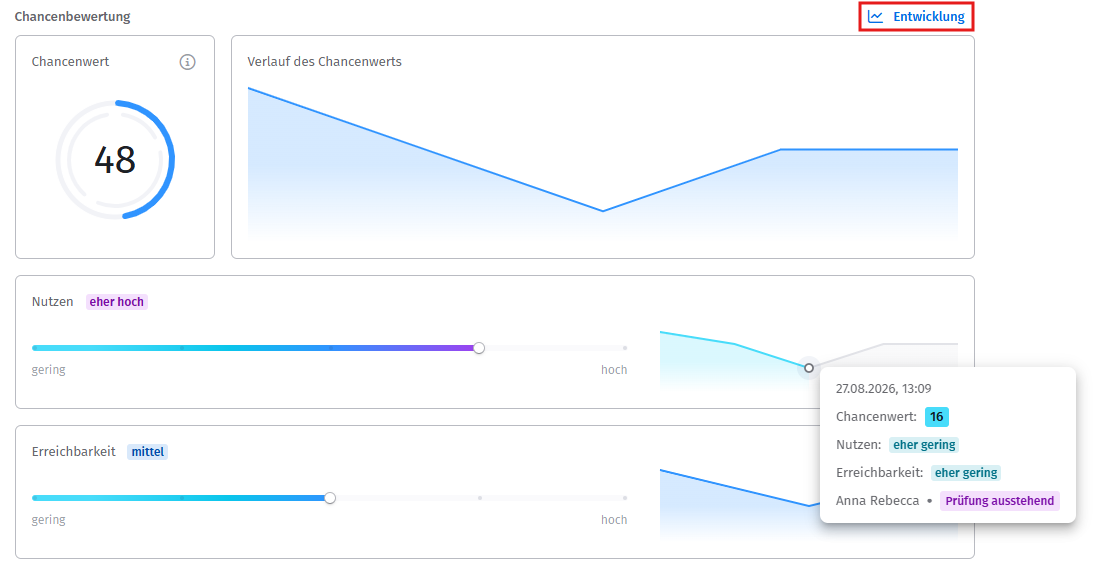
Über den Button Entwicklung blendest du den Verlauf der Werte ein oder aus. Im Verlauf siehst du, wie sich Nutzen, Erreichbarkeit und Chancenwert über die Zeit entwickelt haben.
Fährst du mit der Maus über die Grafik, siehst du zu jedem Zeitpunkt weitere Details:
- Datum und Uhrzeit
- Chancenwert
- Nutzen
- Erreichbarkeit
- die Person, die den Status festgelegt hat
- den Chancenstatus zum jeweiligen Zeitpunkt
Verwandte Artikel
War dieser Artikel hilfreich?
Das ist großartig!
Vielen Dank für das Feedback
Leider konnten wir nicht helfen
Vielen Dank für das Feedback
Feedback gesendet
Wir wissen Ihre Bemühungen zu schätzen und werden versuchen, den Artikel zu korrigieren