Jedem Risiko kann ein Risikotyp zugeordnet werden. Der Risikotyp dient der Kategorisierung nach Herkunft bzw. Art des Risikos und ermöglicht eine gezieltere Auswertung und Filterung in den Ansichten.
Standard-Risikotypen
Im Standard stehen dir folgende Risikotypen zur Verfügung:
| Risikotyp | Beschreibung |
|---|---|
| Operationelles Risiko | Risiken aus internen Prozessen, Systemen oder Mitarbeiterhandeln. |
| Finanzielles Risiko | Risiken mit direkter Auswirkung auf die finanzielle Lage des Unternehmens. |
| IT- und Cyber-Risiko | Risiken durch IT-Systeme, Datensicherheit oder Cyberangriffe. |
| Rechtliches & Compliance-Risiko | Risiken durch Verstöße gegen Gesetze, Vorschriften oder vertragliche Pflichten. |
| Reputationsrisiko | Risiken mit negativer Auswirkung auf das Ansehen des Unternehmens. |
Gut zu wissen: Der Risikotyp steht nur beim Vorgangstyp Risiko zur Verfügung, nicht bei Chancen.
Risikotypen anpassen
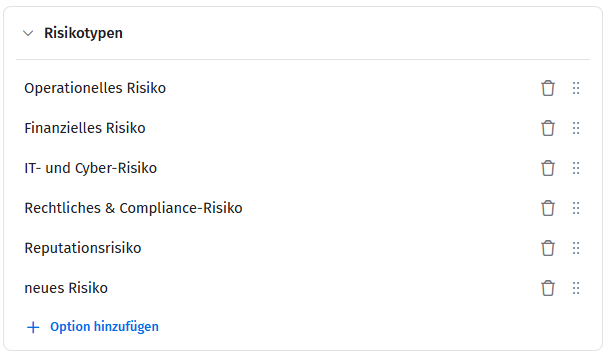
Die Liste der Risikotypen ist nicht fest vorgegeben, sondern kann in den Team-Einstellungen individuell angepasst werden. Du kannst bestehende Typen umbenennen, eigene Risikotypen ergänzen oder die Reihenfolge der Anzeige anpassen.
- Öffne in deinem Team die Vorgangstypen.
- Klicke beim Vorgangstyp Risikoauf das Zahnrad-Symbol, um ihn zu konfigurieren.
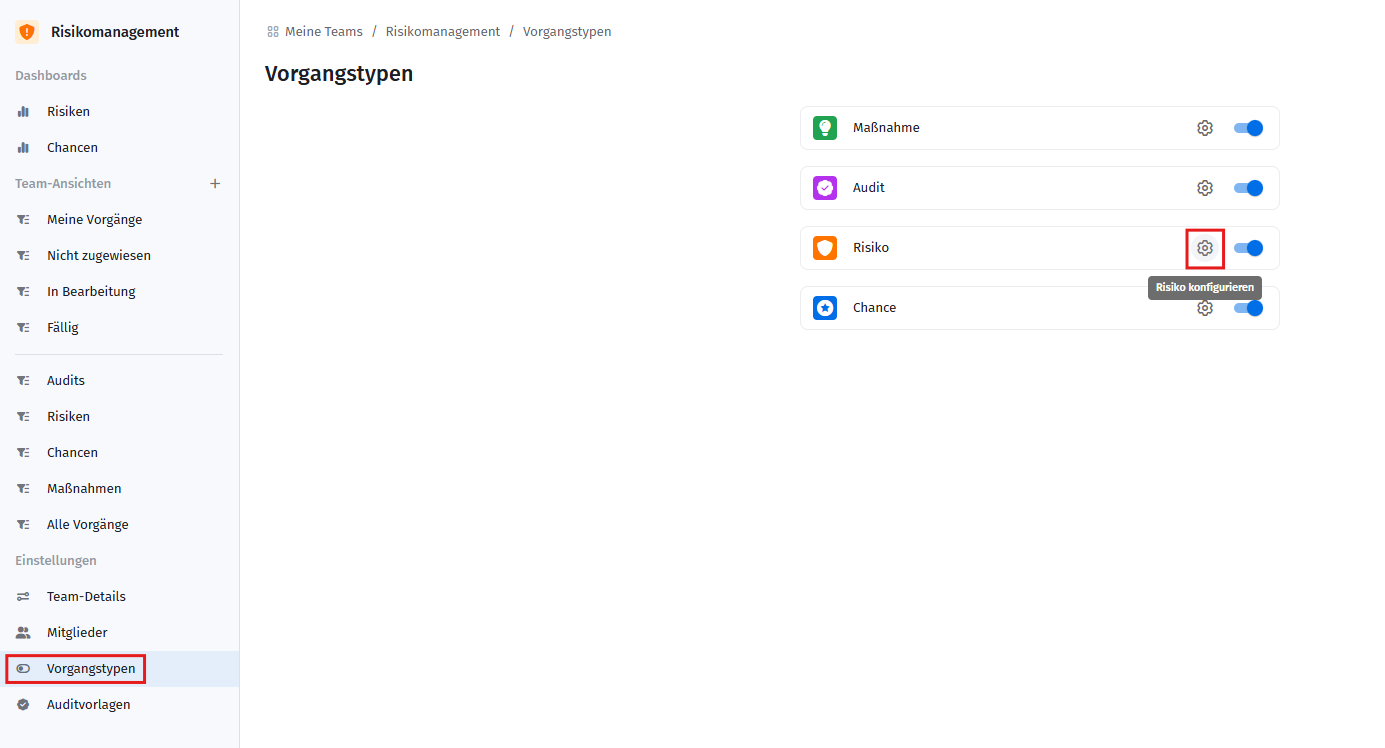
- Passe die Risikotypennach Bedarf an:
- Klicke auf Option hinzufügen, um einen neuen Risikotyp zu ergänzen.
- Klicke auf einen bestehenden Risikotyp, um ihn umzubenennen.
- Ziehe einen Risikotyp am Symbol mit den sechs Punkten, um die Reihenfolge zu ändern.
- Klicke auf das Papierkorb-Symbol, um einen Risikotyp zu entfernen.
Verwandte Artikel
War dieser Artikel hilfreich?
Das ist großartig!
Vielen Dank für das Feedback
Leider konnten wir nicht helfen
Vielen Dank für das Feedback
Feedback gesendet
Wir wissen Ihre Bemühungen zu schätzen und werden versuchen, den Artikel zu korrigieren