Q.wiki has a new semantic search. This means you'll find content even when you don't hit the exact word. Typos, different word endings or alternative phrasings no longer matter. With the latest update, the search has become even more accurate – in result quality, in how results are displayed, and through new filters.
What's changing
With semantic search, Q.wiki understands the meaning behind your query – regardless of how precisely you phrase it. Looking for a particular process description but can't remember the exact title? No problem. The new search will still get you there.
Keywords and full questions both work. Keyword search has been improved: document numbers and key terms are now found reliably. And the longer your query, the more weight Q.wiki gives to its meaning. In short: use a document number or a precise keyword when you know exactly what you're after – and phrase a full question when you'd rather describe it in your own words.
What you can do now
Flexible with word forms and spelling
Whether you type “request leave” or “leave request” – you'll land on the right process. The search recognises both variants.
Multilingual understanding
The new search understands German terms, English terms and many other languages. If you enter a multilingual query, Q.wiki will show you the matching results – no matter which languages are mixed together.
On par with modern search engines
The new search brings Q.wiki up to the level of Google, Outlook or social media. It adapts to the way you naturally search. That makes working in Q.wiki faster, more intuitive and more efficient.
New in the quick search
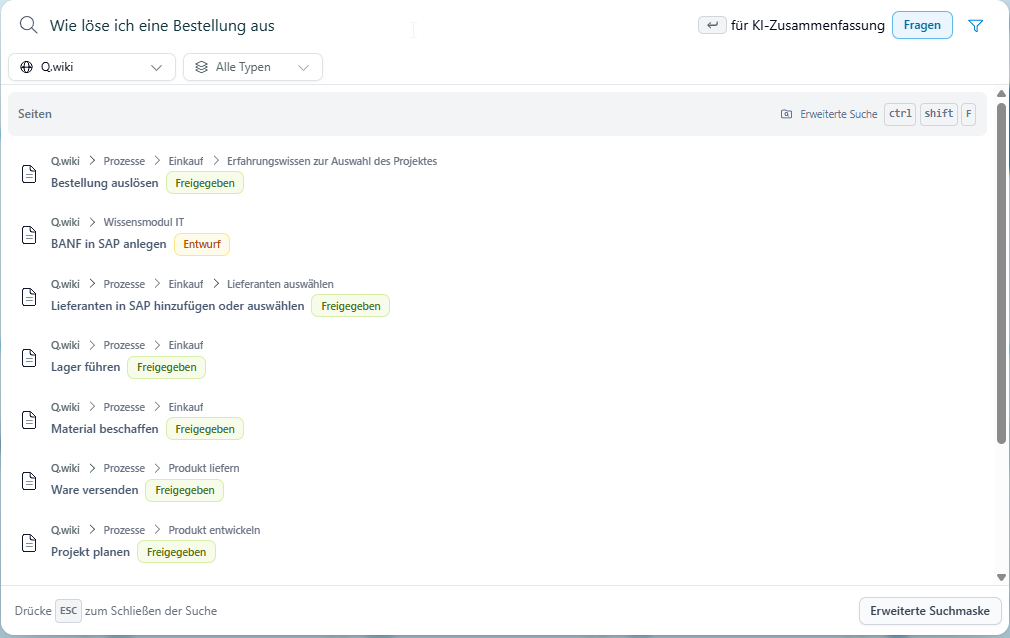
The quick search in the header now gives you more context for every hit – so you can tell whether a result fits without having to open it:
- Breadcrumb path: you can see straight away where the page sits in Q.wiki.
- Page status: it's shown whether the page is a draft or an approved version.
- Filter by unit: narrow the results down to a specific area.
- Filter by page type: wiki page, file page or attachment.
New in the advanced search
The advanced search has been given a clearer layout:
- Your search term is highlighted in the summary – so you can see at a glance why a result was found.
- Breadcrumb path and page status (draft or approved version) are displayed.
- Filter by page type: page, file page or attachment.
AI Answer (AI module only)
The sources listed now indicate whether the underlying page is a draft or an approved version. This makes it easier to judge an answer before you rely on it.
Try it out
Just type a term into the search bar that used to be hard to find. You'll be surprised how well Q.wiki understands you now.
Was this article helpful?
That’s Great!
Thank you for your feedback
Sorry! We couldn't be helpful
Thank you for your feedback
Feedback sent
We appreciate your effort and will try to fix the article