To maintain the audit trail and content history, users in Ariadne cannot be deleted, only deactivated. After deactivation, users can no longer access Ariadne.
Overview
Users are managed either directly in Ariadne or in the central directory service (Active Directory). Deactivation occurs differently depending on where the user is managed. You can see how a user is managed in the User management section.
Step-by-step
- Open User management in the Tool menu under Administration.
- Click the three-dot menu at the end of the row for the user you want to deactivate. One of two options will appear:
For users managed in Ariadne
If a context menu with options appears, the user is managed in Ariadne.

Click the deactivation option in the context menu.
For centrally managed users
If the following message appears, the user is centrally managed and cannot be deactivated directly in Ariadne.
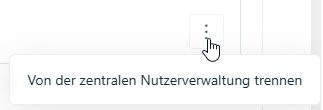
For these users, you have two options:
- Deactivate the user or remove them from the group in the central user management (Active Directory). During the next synchronization with the user directory, the user will be automatically deactivated in Ariadne.
- Disconnect the user from management and then deactivate them manually in Ariadne. Caution: If the user is still active in the user directory, they will be automatically reactivated in Ariadne during the next sync.
Result
The user is now deactivated and can no longer log in to Ariadne.
Related articles
Was this article helpful?
That’s Great!
Thank you for your feedback
Sorry! We couldn't be helpful
Thank you for your feedback
Feedback sent
We appreciate your effort and will try to fix the article