A proof shows that someone has a skill. Ariadne uses it to calculate how long the skill is valid and shows you in the matrix and the overview where something is missing or about to expire.
The skills matrix: who has what, who is missing what
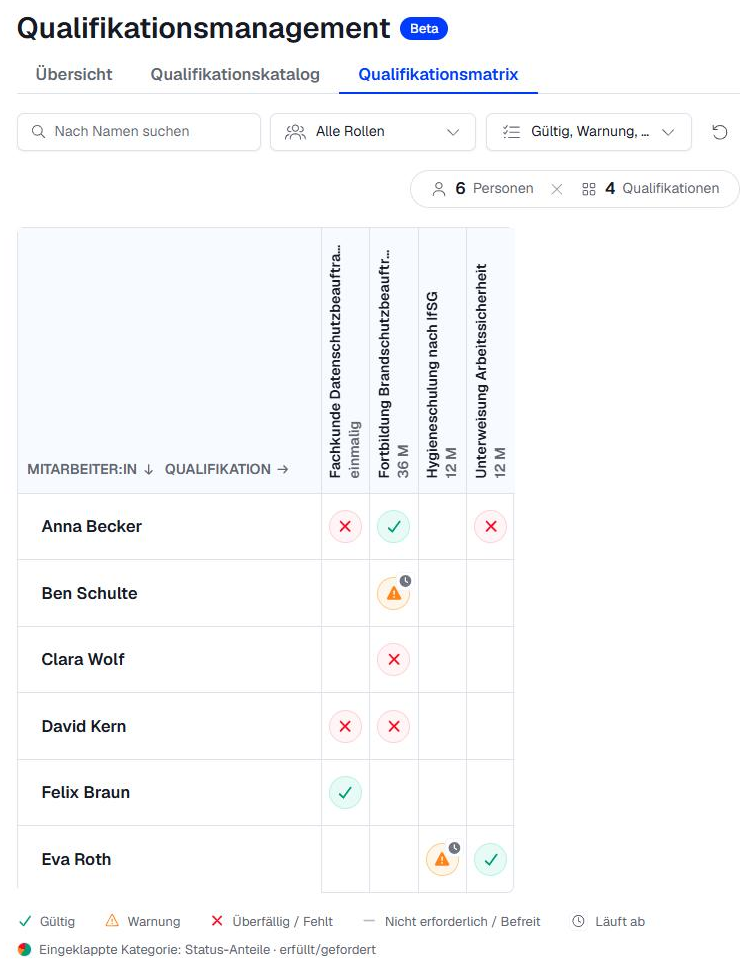
The Skills matrix tab shows all people and their skills at a glance, grouped by category. At the top, you can narrow down the view:
- Search by name
- Filter All roles
- Filter Status, for example "overdue / missing"
- Filter All categories, once categories exist
This way, you can find all first aiders whose proof is about to expire in seconds.
What the symbols mean
Each cell in the matrix shows a symbol. The legend is at the bottom of the matrix.
| Status | Symbol | Meaning |
|---|---|---|
| valid | ✓ green | A valid proof exists. |
| warning | ⚠ orange with clock | The proof is still valid but expires soon. The reminder date has been reached. |
| overdue | ✕ red | The proof has expired. |
| missing | ✕ red | There is no proof yet. |
| not required / exempt | — grey | The skill is not required for this person, or the person is exempt from it. |
Who can record proofs
| Who | For whom |
|---|---|
| Module responsibles and groups with the "Read and edit" permission | For everyone |
| Supervisors | For their team |
| Everyone | For themselves, in their own user profile |
Record a proof
- In the Skills matrix, click the cell for the person and skill. The requirement opens on the right.
- Under Record or update proof, enter the Issue date.
- Optional: Attach a certificate via Choose file …, or write a Note, for example the provider or certificate number.
- Click Save proof.
The status changes to "valid". Under Current proof], you can see when the proof was issued and how long it is valid.
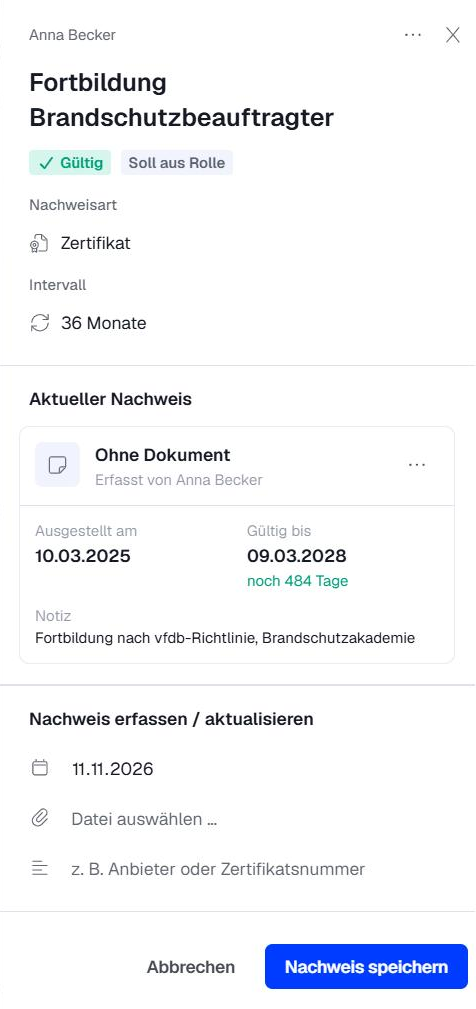 Date: The issue date cannot be in the future.
- Files: PDF, PNG or JPG, up to 20 MB.
- Made a mistake? Click ··· next to the current proof and select Withdraw proof. The previous proof then applies again.
Exempt someone from a skill
If someone exceptionally does not need to prove a required skill, you set an exemption.
- In the Skills matrix, click the cell for the person and skill.
- Click [PRÜFEN: UI-Begriff „Von dieser Pflicht befreien“ – vermutlich Exempt from this requirement].
- Enter a reason and confirm.
The cell then shows "exempt". Supervisors can exempt people in their team, but not themselves.
The overview: where you need to act
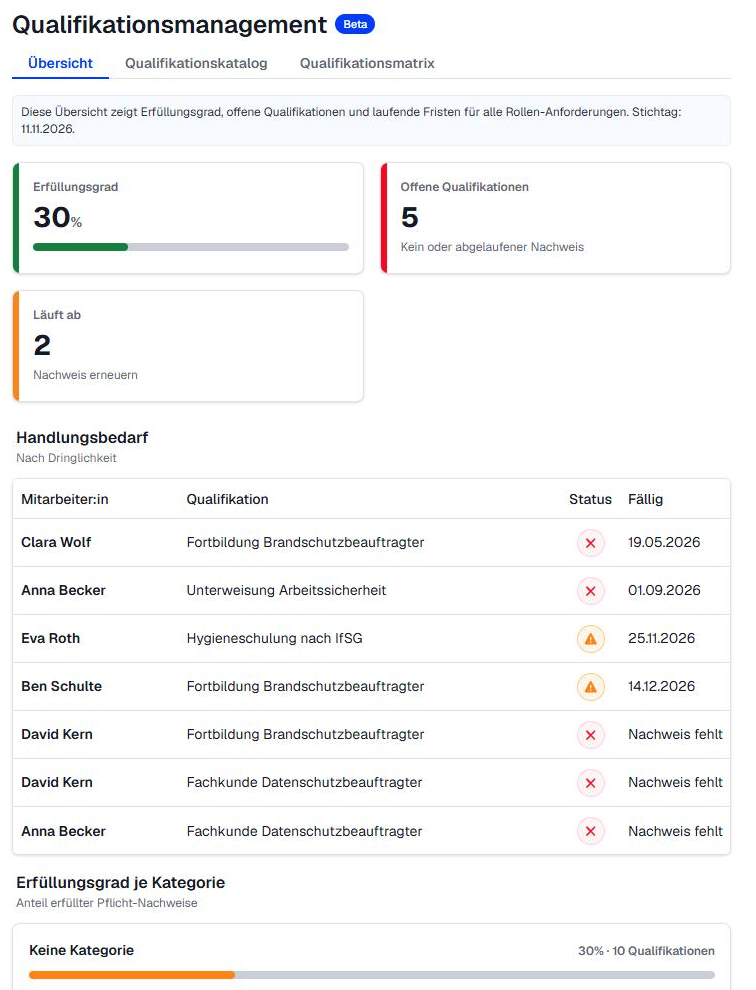
The Overview tab shows how well your company is positioned overall:
- Coverage rate: share of required proofs covered
- Unmet requirements: no proof, or its validity expired
- Expiring: proofs that need renewing soon
- Action needed: all open items by urgency, with due date
- Coverage rate per category
Reminders and tasks
You don't have to chase anyone. Ariadne reminds each person directly:
- Before expiry, they get a notification. How early is set in the skill's Reminder field (in days before expiry).
- If the proof is missing or has expired, they get a task.
- As soon as a new proof is recorded, the task is completed automatically.
You can find your tasks in the sidebar under Tasks and notices under Notifications.
Related articles
Was this article helpful?
That’s Great!
Thank you for your feedback
Sorry! We couldn't be helpful
Thank you for your feedback
Feedback sent
We appreciate your effort and will try to fix the article